- Owner
- Our own product (minidev.pro)
- Category
- B2B SaaS, visual website feedback
- Status
- Live, self-serve sign-up
- Our role
- Product, design, build, pricing and operation
- Stack
- Next.js, Supabase, Stripe billing
- Works on
- Framer, Webflow and custom-coded sites, staging or live
- Pricing
- One Pro plan, $24/month billed annually, 14-day trial, no card
The problem: feedback that points at nothing
Every website project ends in the same place: feedback. It arrives as a screenshot pasted into Slack, a long email about "the button on the pricing page", or a spreadsheet of changes where half the rows point at the wrong element. The developer spends the first ten minutes of every change working out what the comment is about. The client explains it again. The round trip repeats for every page.
Three people feel this. The client has to describe a visual problem in words, often in a tool they do not normally use. The project manager at an agency or freelance studio copies notes from email into a task list and chases replies. The developer has to reproduce what the client saw: which page, which screen size, which state of the page, which of three similar buttons.
It is hard because feedback on a website is about a specific element in a specific state, while email and chat only carry words and flat images. Most fixes for this ask the client to learn something new: a guest portal, a browser extension, a ticketing tool. Every extra step lowers the chance that a busy client will use it at all.
The fix is to put the comment where the problem is. If a client can click the exact heading, button or image on the real page and type next to it, there is nothing left to interpret. That one idea is FeedbackFlow.
Why we built our own product
Most agencies only ever spend client money. We wanted a product where we carried the whole risk: scope, design, pricing, billing, hosting and support. It keeps us honest. When we tell a founder to cut a feature from version 1, we have already made that call on our own product and lived with the result.
It also gives every prospective client something to inspect. You can sign up for FeedbackFlow, add the snippet to a staging site and judge our work as a customer would, before you ever book a call.
What FeedbackFlow does, step by step
The product is built around one loop: install once, share a link, click and comment, work the thread. Everything else supports that loop.
1. Add the snippet once
The site owner adds a small script to their site one time. It works on sites built with Framer, Webflow or custom code, and on staging as well as live sites. After that, nobody needs to touch the site's code again to collect feedback.
2. Share a feedback link
To ask for feedback, the owner adds ?mode=widget to the address of any page on that site and sends the link. When a reviewer opens it, that page becomes an interactive canvas. The reviewer does not create an account, install an extension or visit a separate portal. Without the parameter, the site looks and behaves exactly as normal for everyone else.
3. Click, comment, highlight, capture
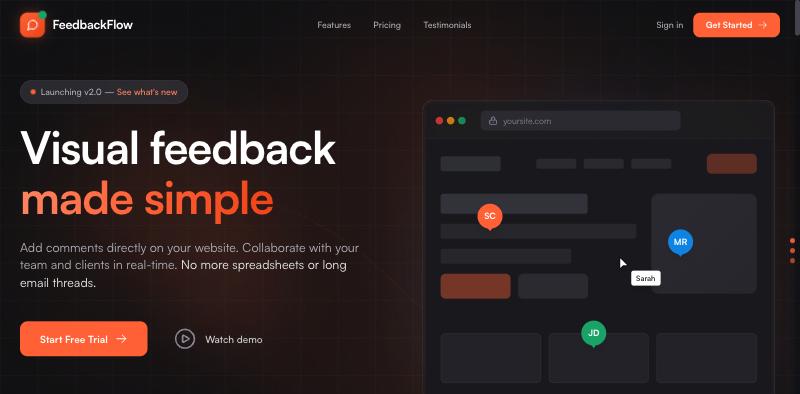
In feedback mode the reviewer clicks the element they mean and types a comment next to it. They can also highlight an area of the page and take a screenshot, so the comment carries the visual context of what they were looking at. The comment is pinned to that spot, which is what the coloured pins in the homepage mockup above represent.
4. Work the thread
Each comment is the start of a thread. The team and the client reply in context, and someone marks the comment resolved when the change is done. Real-time notifications tell people when a new comment or reply arrives, so feedback does not sit unseen in a dashboard.
5. Control who sees what
Projects can be protected with a password, which decides who can view and add comments. Custom branding lets an agency match the widget's colours and style to the site or to its own brand, because it is the agency's clients who see it.
6. Pay with one plan
Billing runs on Stripe. There is one Pro plan with everything included, at $24 a month on annual billing, and a 14-day free trial that does not ask for a card.
| Feature | What it does | Why it made version 1 |
|---|---|---|
| Script snippet | One-time install on Framer, Webflow or custom-coded sites | The comment has to happen on the real page, not a copy of it |
?mode=widget link | Turns any page into a comment canvas for whoever opens the link | Clients will not create accounts to say "make this bigger" |
| Pinned comments, highlights, screenshots | Feedback carries its location and what the reviewer saw | The whole promise: no guessing which button |
| Threads and resolve | Replies in context, and a clear done state | Feedback is a conversation, and someone has to know what is finished |
| Real-time notifications | People hear about new comments and replies | A comment nobody sees is worse than an email |
| Project passwords | Decide who can view and comment on a project | Staging sites and client work are private by default |
| Custom branding | Colours and styling that match the site | Agencies put the widget in front of their own clients |
| Stripe billing | One Pro plan, monthly or annual, 14-day trial | A product that cannot take money is a demo |
How it fits together
FeedbackFlow has four moving parts, and each one has a single job.
- The snippet lives on the customer's site. On normal visits it stays out of the way. When the page address carries
?mode=widget, it loads the feedback layer on top of the page. - The feedback layer is what the reviewer uses: pick an element, pin a comment, highlight, capture. It sends each comment, with where it belongs on the page, to the backend.
- The backend stores teams, projects, comments and replies. It runs on Supabase, a hosted Postgres database with built-in authentication. Its job is to know which team owns each project and comment, and who may read them.
- The dashboard is the team's side, built with Next.js: projects, comment threads, resolve, notifications, branding, passwords and billing. Stripe handles payment and the subscription itself.
Hard problems and the decisions behind them
1. Reviewers must not need an account
The problem. The people giving feedback are usually clients. They are busy, not technical, and they will not sign up for a tool to leave three comments.
The options. A guest portal with an invite and a login. A browser extension the reviewer installs. Or a switch built into the page itself.
What we chose. A switch in the address: ?mode=widget. The reviewer opens a normal link and the page becomes commentable. Nothing to install, nothing to remember.
The trade-off. Anyone holding the link can open feedback mode. That is why project passwords exist: the link is easy to share, and the password decides who can actually see and add comments.
2. A snippet on the real site, not a copy of it
The problem. Feedback is only precise when it happens on the real page, with its real fonts, scripts and behaviour. A static screenshot or a mirrored copy drifts from the truth the moment the site changes.
The options. Load the site through a proxy into our own frame, ask reviewers to upload screenshots, or run a small script on the site itself.
What we chose. A one-time script. It works on staging and live sites, and on Framer, Webflow and hand-written code.
The trade-off. The script runs inside pages we do not control, next to CSS and JavaScript we have never seen. A widget like this must not break the host page, must not pick up the host's styles by accident and must stay small enough that nobody notices it loading. The usual tools for that are style isolation (for example a shadow DOM), a namespaced global footprint and loading the feedback layer only when feedback mode is on.
3. Keeping a comment attached to the right element
The problem. Websites change between the moment a comment is left and the moment someone reads it. Text wraps differently on another screen size, a section moves, a developer ships a fix. A pin saved as a bare screen position ends up pointing at nothing.
The approach. FeedbackFlow pins comments to the element they are about, not to a coordinate. A robust anchor in a tool like this records more than one clue: a path to the element in the page structure, the point inside the element that was clicked, the page address and the screen size at the time. The screenshot and highlight give a human fallback: even if the page has changed, the reader can see exactly what the reviewer saw.
4. Many teams, one database
The problem. Every project belongs to a team, and every comment to a project. A comment from one agency's client must never be visible to another agency.
What it needs. Access has to be a server-side rule checked on every request, not something the interface merely hides. On Postgres, the natural place for that rule is the database itself, with row-level policies that tie each row to its team, so a bug in a screen cannot leak another team's data.
5. One plan instead of three
The problem. Tiered plans look clever on a pricing page and cost weeks of edge cases in code: what happens to comment number 101 on a 100-comment plan, or to a fourth project on a three-project plan?
What we chose. One Pro plan with everything included, $24 a month billed annually, and a 14-day trial with no card. It kept version 1 small, kept the billing code to one happy path plus trial, renewal and cancellation, and kept the pricing page honest.
Testing and quality: what has to hold
A feedback tool fails in public, on someone else's website, in front of their client. These are the things a product like this has to be checked against before and after every release:
- Host-page compatibility. Old WordPress themes, heavy Webflow and Framer sites, and single-page apps that change the page without a reload. The widget must load, and the host page must look and work the same with it.
- Normal visitors see nothing. Without
?mode=widget, the snippet must not change the page. - Anchors survive change. A comment left on a desktop screen must still find its element on a laptop, and still make sense after a layout change.
- Access. A password-protected project must refuse a reviewer without the password, and one team must never read another team's comments, whatever the interface sends.
- Billing states. Trial start, trial end, renewal, cancellation and a failed payment each lead to the right access level.
We only publish numbers that a reader could check, so this page does not quote a test count or uptime figure for FeedbackFlow.
Results and status
FeedbackFlow is live at feedbackflow.minidev.pro. Anyone can sign up, start the 14-day trial without a card and install the snippet on their own site. That is the most honest result we can offer: the product is there to be tested.
We do not publish customer counts, revenue or usage figures on this page. What the product proves for a buyer is narrower and more useful: we can take a SaaS idea through scope, design, an embeddable script, multi-tenant data, subscription billing and production hosting, and then keep running it.
What we would tell a founder building something similar
- Write the core loop in one sentence and refuse to build anything else until it works on a real site.
- Remove every step between your user and the first comment. For FeedbackFlow that meant no reviewer account at all.
- Launch with one price. You will learn more from the first paying customers than from a three-tier pricing table.
- Treat embeds as hostile territory. Test the widget on old WordPress themes, heavy Webflow sites and single-page apps before launch.
- Make access control boring and server-side. It is the part nobody praises and everybody notices when it fails.
A focused SaaS with an embeddable script, multi-tenant projects and subscription billing fits the 30-day full product build when version 1 is honest about scope. The week-by-week MVP timeline shows how we split a build like this, and the MVP cost calculator gives you a price range in a minute.
Questions about this project
Is FeedbackFlow client work?
No. FeedbackFlow is our own product. We designed, built, priced and run it, which is why we can talk about every decision on it in detail.
Do the people giving feedback need an account?
No. The site owner adds ?mode=widget to a page address and shares the link. Whoever opens it can click, comment, highlight and take screenshots without signing up. Project passwords control who can see and add comments.
Which websites does FeedbackFlow work on?
Sites built with Framer, Webflow or custom code, on staging or live, once a small script has been added one time.
How much does FeedbackFlow cost?
One Pro plan at $24 a month billed annually, with a 14-day free trial that does not need a card.
How long does it take to build a tool like FeedbackFlow?
A focused version 1 with an embeddable widget, pinned comments, threads and billing fits our 30-day full product build when the scope is kept to the core loop. Extras such as integrations come after launch.
How much would a FeedbackFlow-style SaaS cost to build?
Our MVPs start at $5,000 fixed. The final price depends on the add-ons, such as billing, roles and integrations; the MVP cost calculator prices each one.
Can you build a white-label or custom version for my agency?
Yes. An embeddable widget with your branding, your login and your own billing is a typical SaaS build for us. Book a call and we will scope version 1 with you.
Building a SaaS tool like this?
We will map your version 1 to a 30-day plan on a free call.
→ Book a strategy call